The Nest Β· Booking

Priority Round Robin for call types

A call can go to the people a family already knows first β€” their own coach, then their Accountability Coach β€” and fall back to a shared staff group only when none of them is free at the time the family picks. Admins set the order once per call type; families book exactly as they do today.

Built and tested end to end Follows the spec and prototype PR #694 ClickUp 86bc7vd9r

What we're shipping

Today round robin picks fairly from a flat list of staff, with no idea who a family already knows. Fulfillment wants a family's own coach to take the call whenever they can, with the shared group as a safety net. This adds that as a third routing mode, alongside Assigned Staff and Round Robin.

🀝

Familiar faces first

An ordered list of preferred staff on a call type: the family's own Coach or Accountability Coach, worked out for each family, or named people from the group.

πŸ›Ÿ

The group as a safety net

If nobody on the list is free at the time the family picks, the staff group's round robin takes the booking, exactly as it does today.

πŸ“…

More times to choose from

The calendar also offers times when only the family's preferred staff are free β€” like their own coach's early mornings.

πŸ”Ž

CX can see why

Each booking records how it was matched, shown in Edit Booking: "Student's Coach (priority #1)" or "Staff group fallback".

How it works

Example: the weekly coaching call the team asked for. The list is tried top to bottom for the exact time the family picks.

Student's CoachThe family's own coach, whoever that is.
not free?then β†’
Student's Accountability CoachSkipped if the family doesn't have one.
not free?then β†’
Named personOptional β€” any member of the group.
nobody free?then β†’
Staff groupRound robin as today, using the group's own rule.
Strict order, first free wins. There's no balancing between entries: if the coach is free, the coach gets it β€” every time.
Same checks as round robin. "Free" means working hours, existing bookings, their calendar and the daily limit. Nobody is booked past any of them.

Who it applies to

Only call types an admin switches to Priority Round Robin. Everything else books exactly as before.

Who is bookingUses the priority list?Notes
The familyYesPicks a time only; the host is chosen when they confirm. Same wording as round robin today.
Rescheduling a bookingKeeps the hostA reschedule never changes who hosts, so how it was matched is kept.
The family's own coachCan book it for themWhen the list names them (for example "Student's Coach").
CX "Book for student"No β€” CX picks the hostUnchanged. It already bypasses routing.
CX reassigning a bookingClears the matchThe "Matched via" line describes who the list chose; once CX picks someone else, it's cleared. The reassignment log keeps the history.

See it in action

Seven short recordings from a test copy of the Nest, with made-up families and staff β€” a real person's clicks and typing, with a caption under each step.

Admin

Setting it up

Scenario 1

An admin sets up Priority Round Robin

On the Weekly Coaching Call, the admin switches routing to Priority Round Robin.

  • The priority list stays hidden until a staff group is chosen β€” the group is the fallback pool.
  • Entries are added by role (the family's own Coach or Accountability Coach) or by name.
  • Drag to reorder: Student's Coach first, then Student's Accountability Coach.
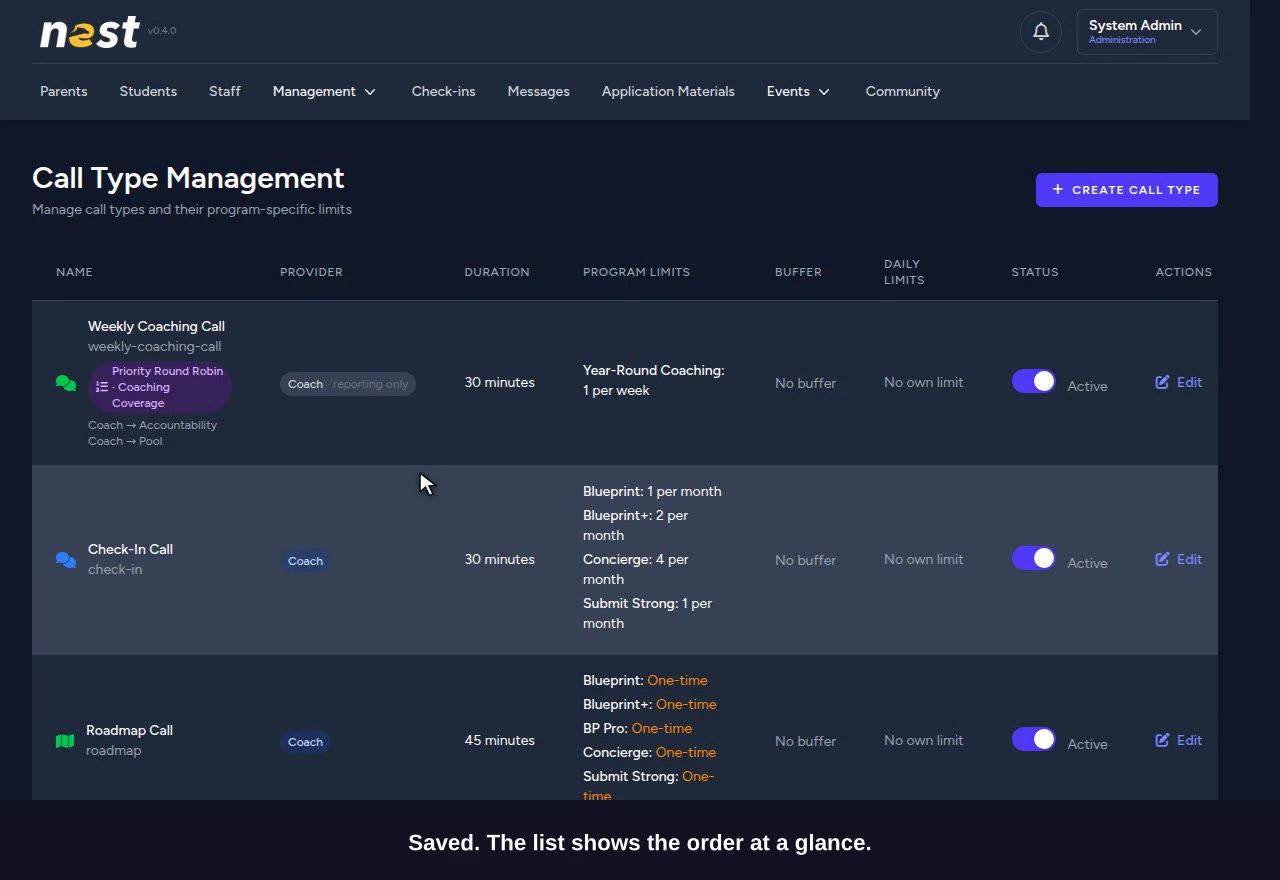
  • The call type list shows the order at a glance: "Coach β†’ Accountability Coach β†’ Pool".
βœ“ Only admins can change routing.
Scenario 2

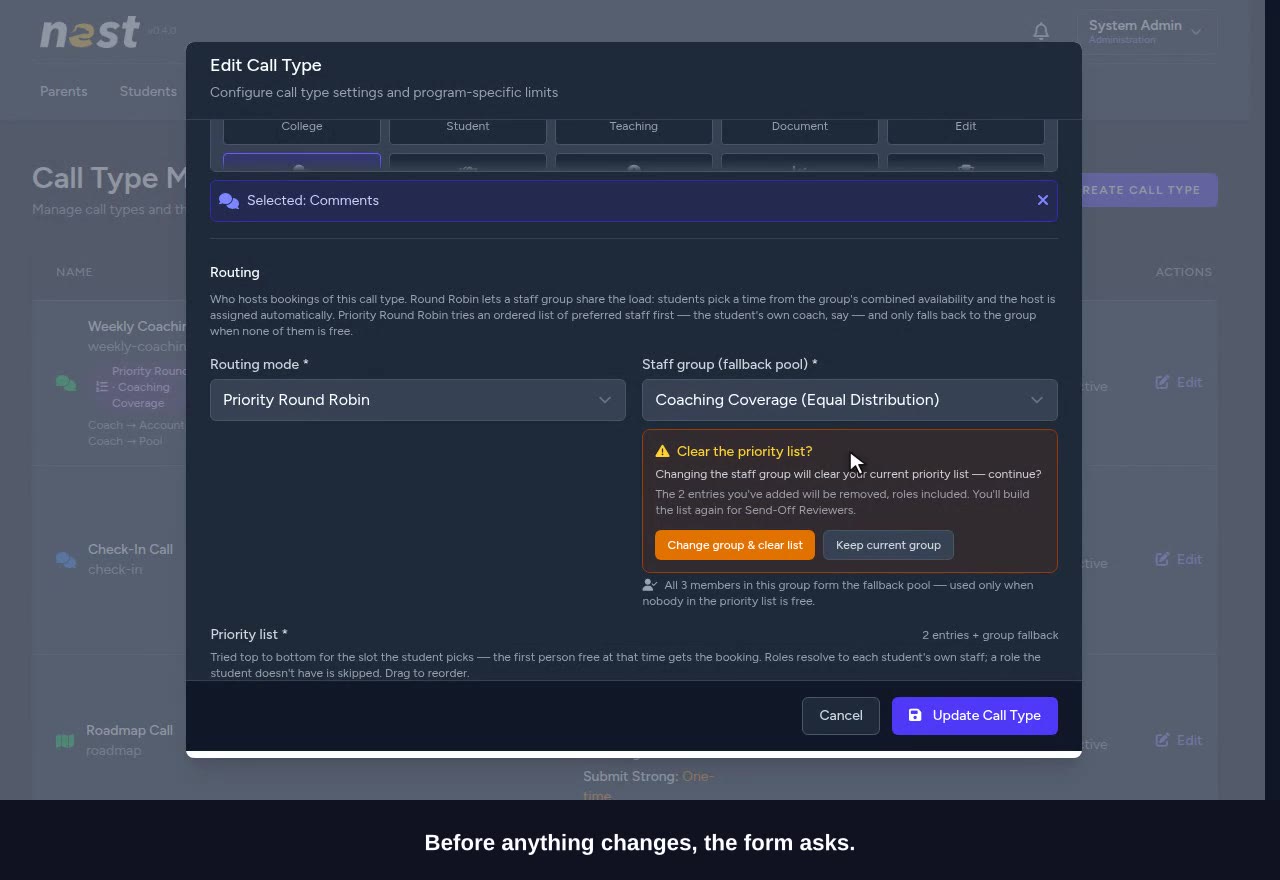
Changing the group asks first

Named people on the list come from the group, so a new group means a new list.

  • Picking another group opens "Clear the priority list?" right under the selector.
  • Keep current group changes nothing.
  • Change group & clear list empties the list, roles included, ready for the new group.
βœ“ Nothing is lost without asking.
Scenario 3

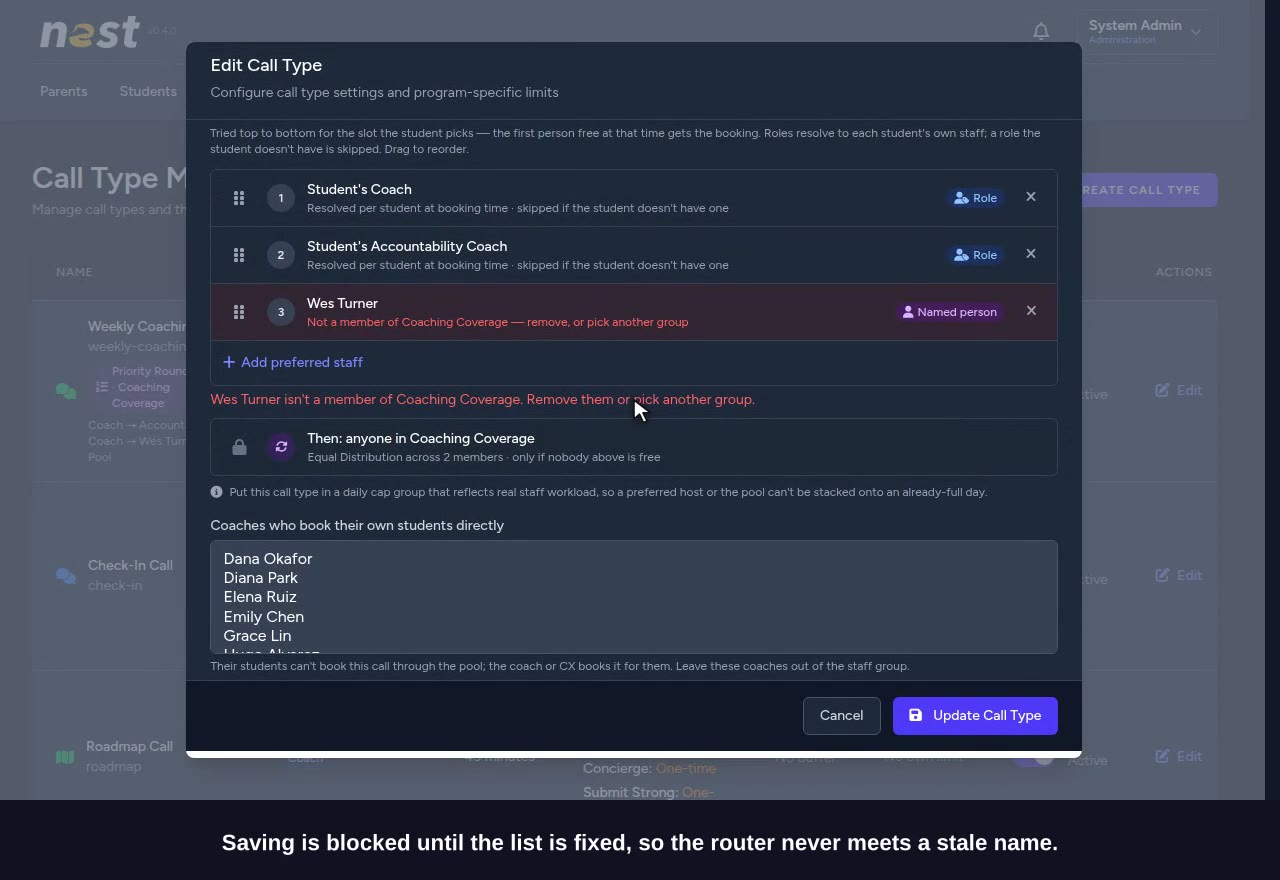
A named person leaves the group

The admin names Wes Turner third on the list. Later, Wes is taken out of Coaching Coverage on the Staff Groups page.

  • Back on the call type, Wes's row is red: "Not a member of Coaching Coverage β€” remove, or pick another group".
  • Saving is refused with the same reason until the row is removed.
  • Until then, bookings simply skip him.
βœ“ The list never quietly points at someone who has left.
Families

Booking

Scenario 4

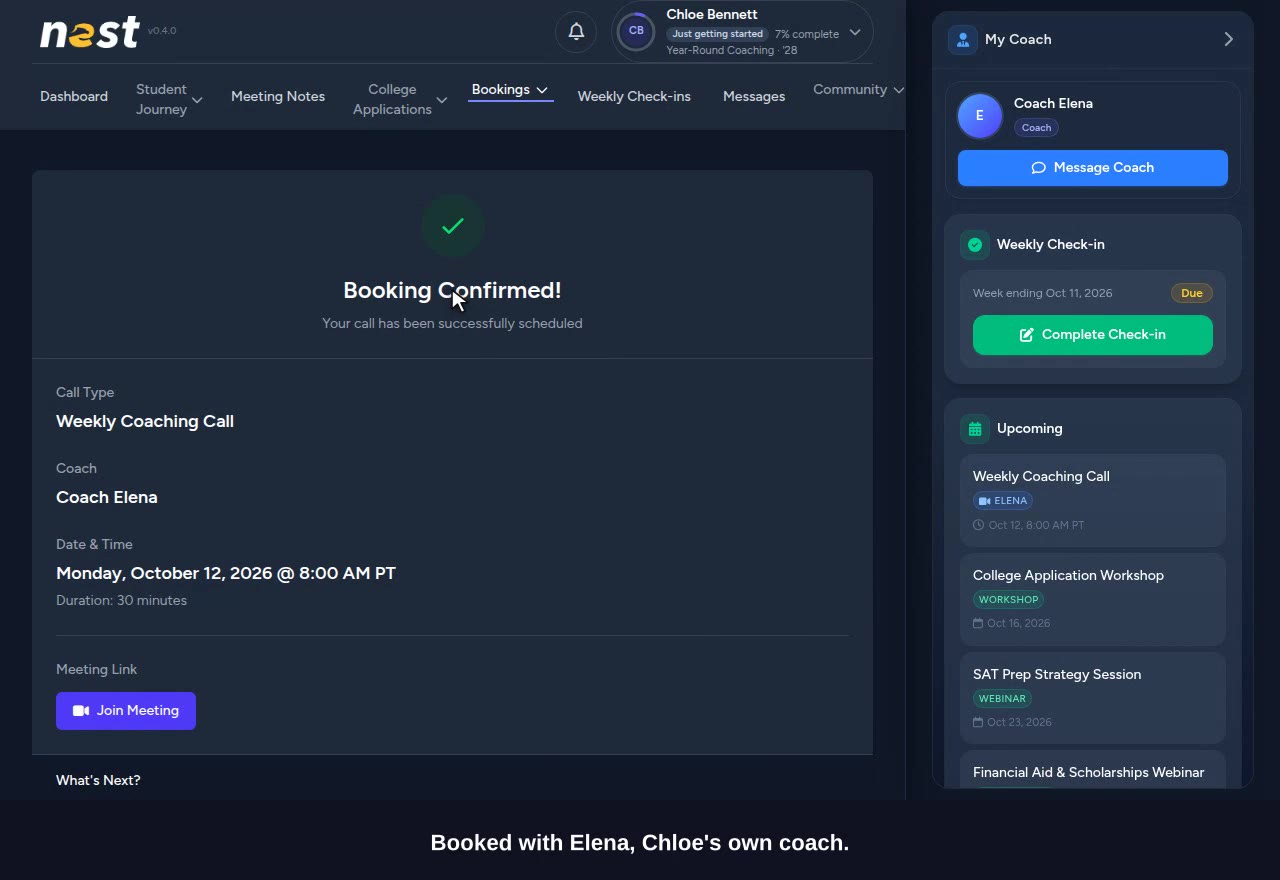
A family gets their own coach

Chloe's coach is Elena, who works 8am–noon. The staff group works 9–5.

  • Chloe's calendar offers 8:00 AM β€” a time only Elena has free.
  • She sees the same "Assigned when you book" message as today.
  • Booked with Elena.
βœ“ No new wording for families.
Scenario 5

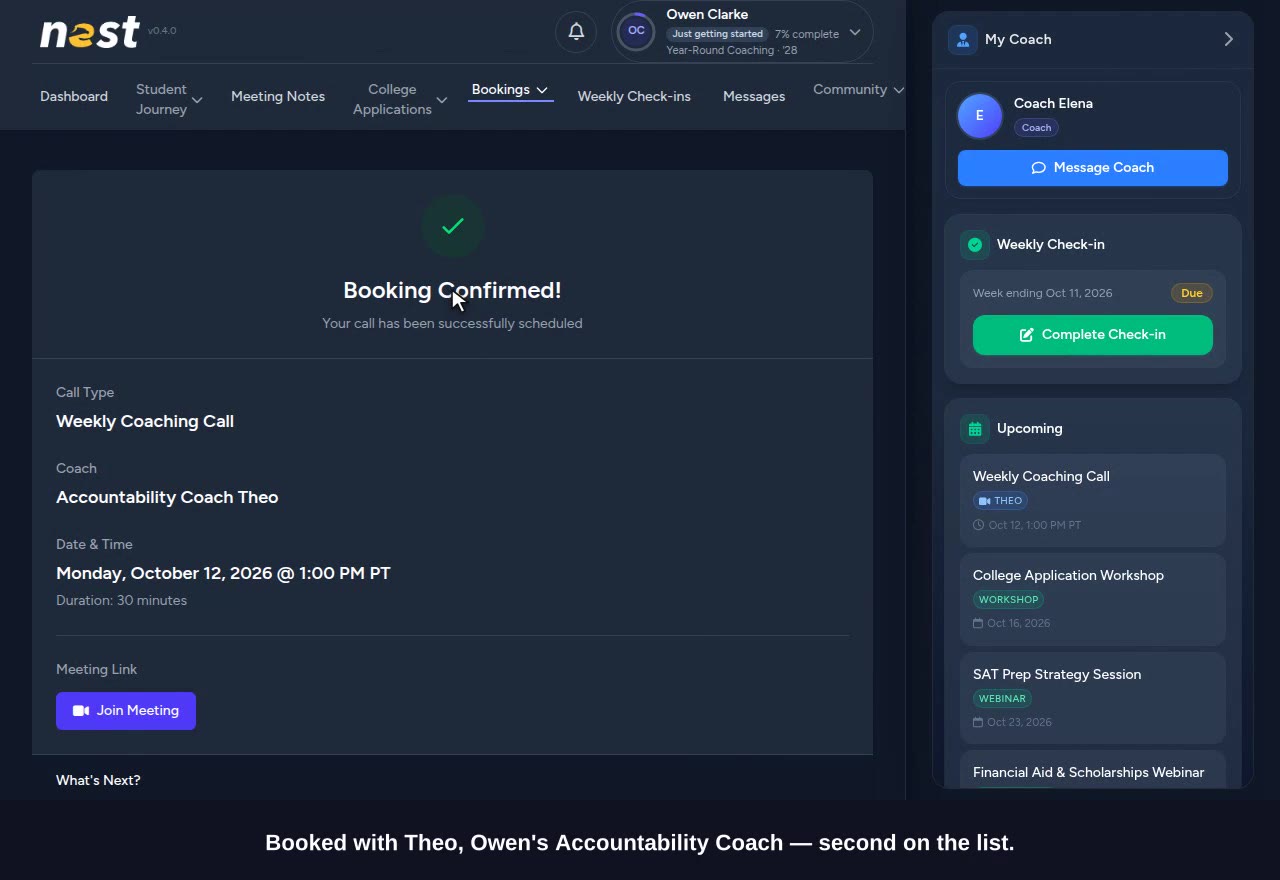
Coach off, the Accountability Coach is next

Owen has the same staff: Elena, then Theo, his Accountability Coach (noon–3pm).

  • Owen picks 1:00 PM. Elena is off after noon.
  • Theo is second on the list and free, so he hosts.
βœ“ Strict order: the first person free at that time gets it.
Scenario 6

Nobody on the list is free, so the group takes it

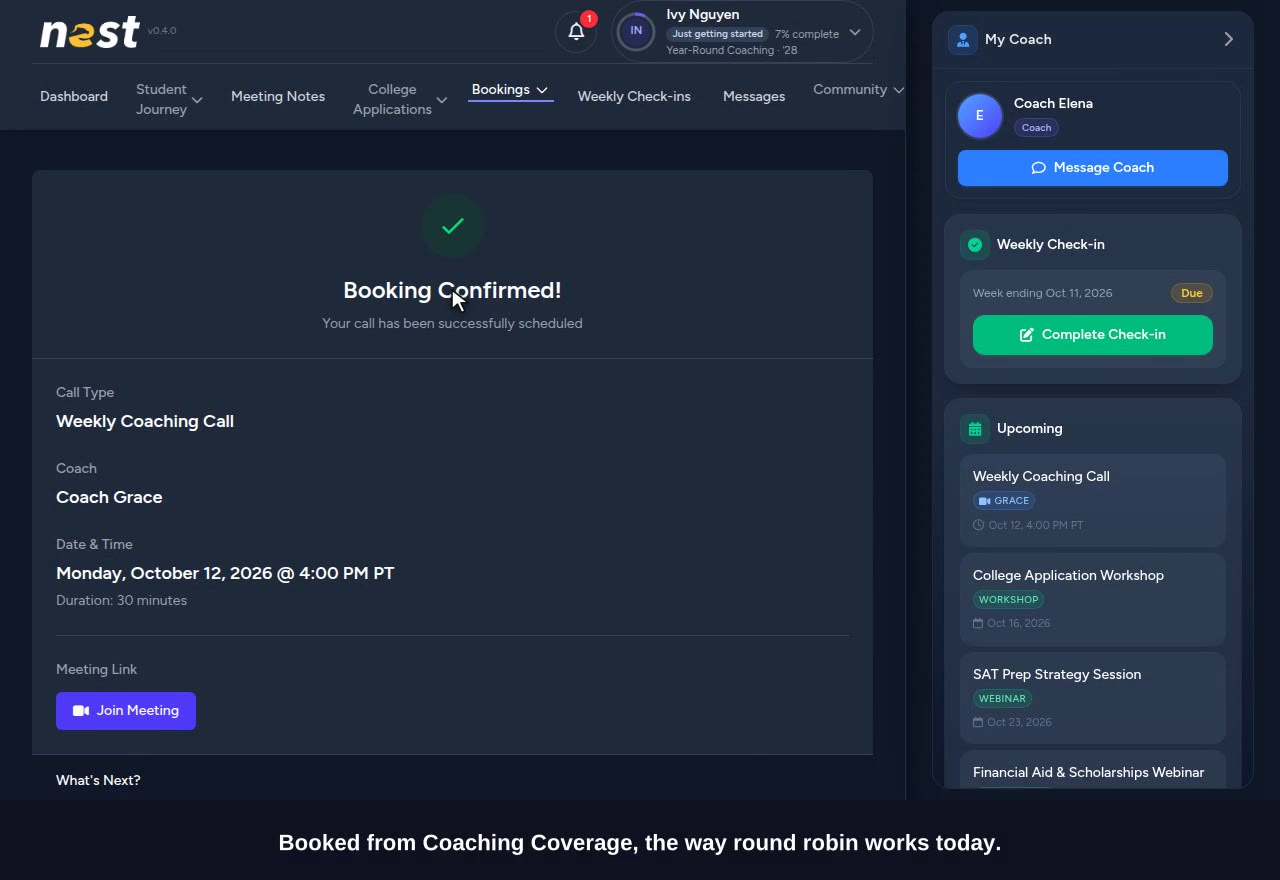
Ivy's coach is Elena. She has no Accountability Coach.

  • Ivy picks 4:00 PM. Elena is off, and the Accountability Coach entry is skipped β€” Ivy has none.
  • Coaching Coverage takes the booking the way round robin works today: the coach with the fewest bookings.
βœ“ A role a family doesn't have is skipped, never a dead end.
CX

Answering "why this coach?"

Scenario 7

CX sees how each booking was matched

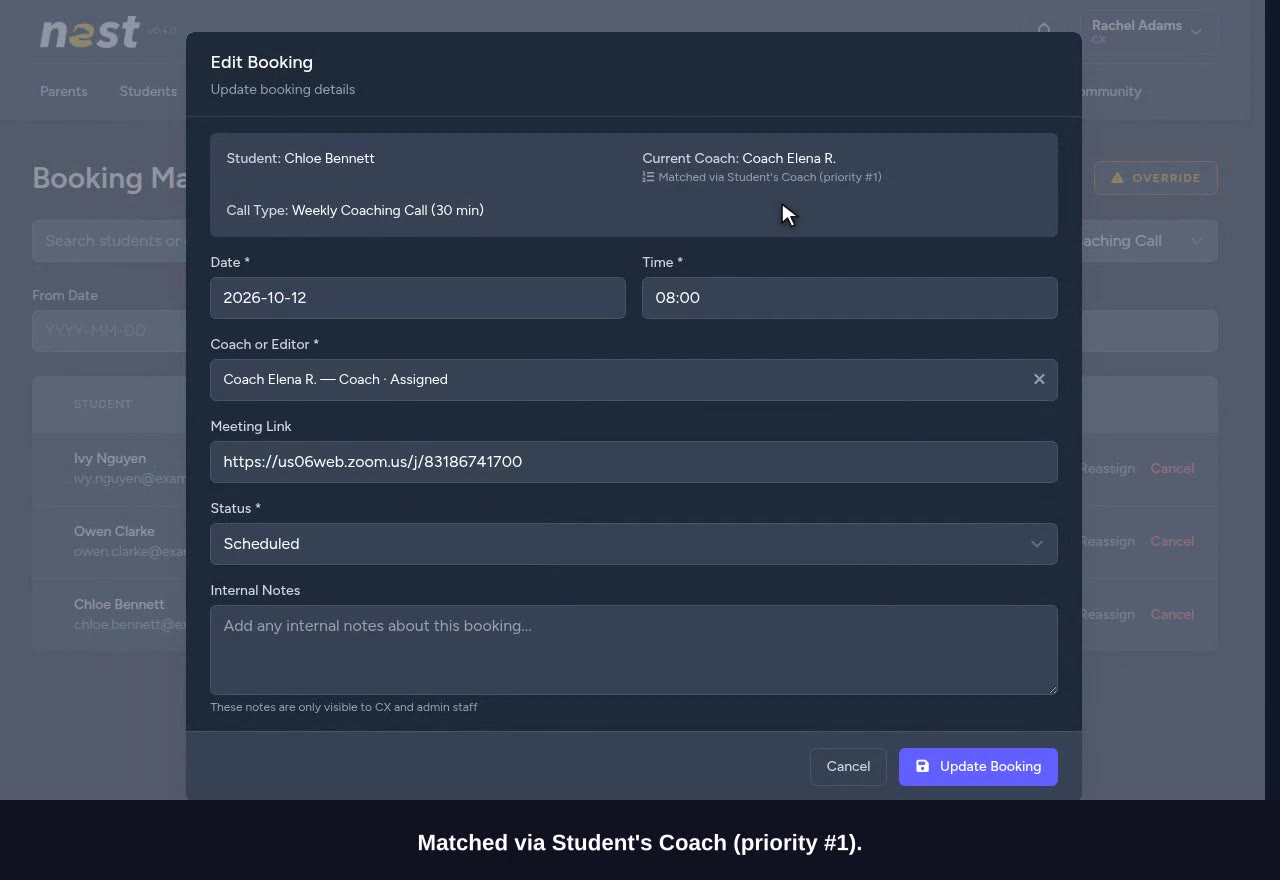
In Edit Booking, under the current coach, a line says how the booking was matched.

  • Chloe: "Matched via Student's Coach (priority #1)".
  • Owen: "Matched via Student's Accountability Coach (priority #2)".
  • Ivy: "Matched via Staff group fallback".
βœ“ Recorded when the booking is made, so it stays right if the family's staff change later.

QA checklist

Work through the sections in order on the staging site (priority-round-robin.staging.egelloc.com). Mark each step Pass, Fail or Skip, and write what happened when something is off. Your marks are saved in this browser; Copy results puts them on the clipboard as a report to paste into ClickUp or Slack.

Every step below was walked on the staging site, end to end and in this order, on October 9 β€” 22 of 22 passed. That walk used up the starting state (bookings made, one reassigned), so ask for a reset before the first tester starts.

Before you start

Every password is password. Sign out between accounts, or use a private window for the second one. One tester at a time: what one person books, the next one sees, so ask for a reset between testers. Times are Pacific. "Next Monday" means the coming Monday; any weekday works the same way. Staging isn’t connected to Zoom, so bookings there show "Zoom link pending"; that is expected.

AccountWhoSet up for
admin@staging.egelloc.comSystem Admin
Admin
Call types and staff groups.
cx@staging.egelloc.comRachel Adams
CX
Bookings page and Edit Booking.
elena.ruiz@example.comElena Ruiz
Coach
Coach of Chloe, Owen and Ivy. Works 8am–noon on weekdays. Not in any staff group.
theo.park@example.comTheo Park
Accountability Coach
Accountability Coach of Chloe and Owen. Works noon–3pm on weekdays. Not in any staff group.
grace.lin@example.comGrace Lin
Coach
In Coaching Coverage with Hugo Alvarez and Wes Turner, all 9am–5pm. Ben's coach.
chloe.bennett@example.comChloe Bennett
Student
Coach Elena, Accountability Coach Theo. No bookings yet.
owen.clarke@example.comOwen Clarke
Student
Coach Elena, Accountability Coach Theo. No bookings yet.
ivy.nguyen@example.comIvy Nguyen
Student
Coach Elena, no Accountability Coach. No bookings yet.
ben.ross@example.comBen Ross
Student
Coach Grace Lin, who is in the group. No bookings yet.
ASetting it upSystem Admin0 / 5
  1. A1

    Management β†’ Call Types β†’ Edit Weekly Coaching Call. Set Routing mode to Priority Round Robin.

    ExpectThe group field reads "Staff group (fallback pool)". No priority list yet.

    Shown in scenario 1

  2. A2

    Pick Coaching Coverage as the staff group.

    Expect"All 3 members in this group form the fallback pool β€” used only when nobody in the priority list is free." The list shows "No preferred staff yet", and the last row reads "Then: anyone in Coaching Coverage Β· Equal Distribution across 3 members".

    Shown in scenario 1

  3. A3

    Press Update Call Type with the list still empty.

    ExpectRefused: "Add at least one preferred role or person β€” or switch to Round Robin."

  4. A4

    Press Add preferred staff β†’ By role β†’ Accountability Coach. Then add β†’ By role β†’ Coach.

    ExpectTwo rows: Student's Accountability Coach (1), Student's Coach (2). Opening the role picker again shows both as "already in list".

    Shown in scenario 1

  5. A5

    Drag Student's Coach above Student's Accountability Coach, then Update Call Type.

    ExpectSaved. The call type list shows "Priority Round Robin Β· Coaching Coverage" and "Coach β†’ Accountability Coach β†’ Pool".

    Shown in scenario 1

BGuard railsSystem Admin0 / 6
  1. B1

    Edit the Weekly Coaching Call again and change the staff group to Send-Off Reviewers.

    Expect"Clear the priority list?" appears under the selector: "The 2 entries you've added will be removed, roles included. You'll build the list again for Send-Off Reviewers."

    Shown in scenario 2

  2. B2

    Press Keep current group.

    ExpectThe group is still Coaching Coverage and both rows are still there.

    Shown in scenario 2

  3. B3

    Add preferred staff β†’ By name.

    ExpectOnly Coaching Coverage members are offered: Grace Lin, Hugo Alvarez, Wes Turner.

    Shown in scenario 3

  4. B4

    Add Wes Turner and press Update.

    ExpectThe list shows "Coach β†’ Accountability Coach β†’ Wes Turner β†’ Pool".

    Shown in scenario 3

  5. B5

    Booking System β†’ Staff Groups β†’ edit Coaching Coverage, untick Wes Turner, Update. Then edit the Weekly Coaching Call.

    ExpectWes's row is red: "Not a member of Coaching Coverage β€” remove, or pick another group". Pressing Update is refused: "Wes Turner isn't a member of Coaching Coverage. Remove them or pick another group."

    Shown in scenario 3

  6. B6

    Remove Wes's row and press Update. Then tick Wes back into Coaching Coverage on Staff Groups.

    ExpectSaved, and the list is back to "Coach β†’ Accountability Coach β†’ Pool". Coaching Coverage has 3 members again.

    Shown in scenario 3

CFamiliesChloe, Owen, Ivy, Ben0 / 7
  1. C1

    Sign in as Chloe β†’ Bookings β†’ Book a Call.

    ExpectIt opens straight on the Weekly Coaching Call calendar: "we'll match you with an available team member".

    Shown in scenario 4

  2. C2

    Pick next Monday.

    ExpectTimes start at 8:00 AM. Only Elena works before 9, so those times are there because she is Chloe's coach.

    Shown in scenario 4

  3. C3

    Pick 8:00 AM, Continue, tick the attendance box and Confirm.

    ExpectThe confirm page says "Assigned when you book". Booking Confirmed! Coach: Elena.

    Shown in scenario 4

  4. C4

    Sign in as Owen and book next Monday at 1:00 PM.

    ExpectBooking Confirmed! Coach: Theo β€” Elena is off after noon, and Theo is second on the list.

    Shown in scenario 5

  5. C5

    Sign in as Ivy and book next Monday at 4:00 PM.

    ExpectBooking Confirmed! Coach: Grace β€” nobody on Ivy's list is free, so Coaching Coverage takes it.

    Shown in scenario 6

  6. C6

    Sign in as Ben β†’ Book a Call β†’ next Monday.

    ExpectTimes start at 9:00 AM, not 8: Ben's coach works 9–5, so the earlier times are not his.

  7. C7

    Book Ben next Monday at 10:00 AM.

    ExpectBooking Confirmed! Coach: Grace, his own coach.

DCXRachel0 / 4
  1. D1

    Sign in as Rachel β†’ Bookings. Edit Chloe's Weekly Coaching Call.

    ExpectUnder "Current Coach": "Matched via Student's Coach (priority #1)". Cancel.

    Shown in scenario 7

  2. D2

    Edit Owen's, then Ivy's.

    ExpectOwen: "Matched via Student's Accountability Coach (priority #2)". Ivy: "Matched via Staff group fallback".

    Shown in scenario 7

  3. D3

    Edit Ben's.

    Expect"Matched via Student's Coach (priority #1)" β€” his own coach happens to be in the group.

  4. D4

    Edit Ivy's again: change the coach to Hugo Alvarez, give a reason, Update. Then reopen it.

    ExpectThe booking is with Hugo, and the "Matched via" line is gone: CX chose the host, not the list.

Q&A

Questions people ask.

Does anything change the day this ships?

No. Every call type keeps routing exactly as it does now until an admin switches it to Priority Round Robin.

Do families see anything new?

No. Before booking they see "we'll match you with an available team member", and afterwards the name of the person they matched with β€” the same as round robin today.

What if the family's coach isn't in the staff group?

That's the point of role entries. "Student's Coach" means each family's own coach, wherever they sit β€” in the group or not.

What counts as "free"?

The same checks round robin already uses: working hours, existing bookings, their Google calendar, and the call type's daily limit. Being preferred never books someone past any of those.

What if a family has no Accountability Coach?

That entry is skipped and the next one is tried. The same goes for a named person who has left the group, or anyone whose account can't host.

Why does the calendar sometimes show more times than before?

The family's preferred staff are now part of the calendar, so a time only their own coach has free is offered too.

Can I put a specific person on the list?

Yes, by name, from the staff group's members. If they later leave the group, the call type flags them and won't save until they're removed; bookings skip them in the meantime.

Does this affect the group's fair share of bookings?

A pool fallback counts as usual. A preferred host who is also in the group counts too, like any call they take. Someone outside the group doesn't touch the group's counts.

How does CX see why a booking went to someone?

In Edit Booking, under the current coach: "Matched via Student's Coach (priority #1)", "Preferred staff member", or "Staff group fallback". If CX reassigns the booking, the line is cleared.

Can the family's own coach book the call for them?

Yes, when the list names them (for example "Student's Coach").

Why is there no Strategist role?

Strategists aren't assigned to students, so "Student's Strategist" would never match anyone.

Can one coach be overloaded by being everyone's first choice?

The daily limits still apply. Put these call types in a daily cap group that reflects real workload β€” the form reminds admins to.

Decisions

The first three follow the ticket, Victor's comment and the prototype. The last three were made while building it β€” say if you'd rather any of them worked differently.

1. No Strategist role

Strategists aren't assigned to students, so the list offers Student's Coach and Student's Accountability Coach only (Victor, on the ClickUp task). "Student's Coach" never matches a strategist.

2. No new wording for families

Families see the same messages as round robin today. The prototype's "Since your coach wasn't available…" note and the "Students see on the card" box were left out, as the spec asks.

3. Someone who leaves the group blocks saving

As in the prototype: the row turns red and the form won't save until it's removed. A member who is only suspended stays saveable, flagged amber.

4. The calendar includes the family's preferred staff

The spec didn't say. Without it, a time only the family's own coach has free could never be picked β€” the very bookings the list exists for.

Made while building it β€” say if you'd rather it worked differently.

5. CX reassignment clears the "Matched via" line

The line describes who the list chose. Once CX picks a different host it would mislead, so it's cleared; the reassignment log keeps the history.

Made while building it β€” say if you'd rather it worked differently.

6. Preferred hosts and the group's counts

A preferred host who is in the group counts toward the group's fair share like any call they take; one outside the group doesn't affect it.

Made while building it β€” say if you'd rather it worked differently.

Rollout

In order β€” each step depends on the one before.

  1. Ship this releaseNothing changes until an admin switches a call type to Priority Round Robin.
  2. Pick the call typesFor example the weekly coaching call: Student's Coach, then Student's Accountability Coach, then the coverage group. Send-Off decided not to use it.
  3. Set up the fallback groupA staff group whose members can take the call when nobody on the list can.
  4. Check daily limitsPut these call types in a daily cap group that reflects real workload, so a preferred host can't be stacked onto an already-full day (this caused an overload once, ClickUp 86bbkjfwx).
  5. Brief CXThe "Matched via" line in Edit Booking answers "why is my call with this person?".

Not included in this release